


Garmin BlueChart Coastal Chart, New Zealand North Coast, Auto Guidance, 1 ft Contours


-
Perfect Fit, Guaranteed
Get the right part every time
-
Expert Support
Our in-house specialists know our products inside and out
-
Enhanced Value & Service
We go beyond the sale with professional and balanced services
-
Wordwide Delivery
Enjoy hassle-free worldwide delivery
Garmin BlueChart Coastal Chart, New Zealand North Coast, Auto Guidance, 1 ft Contours
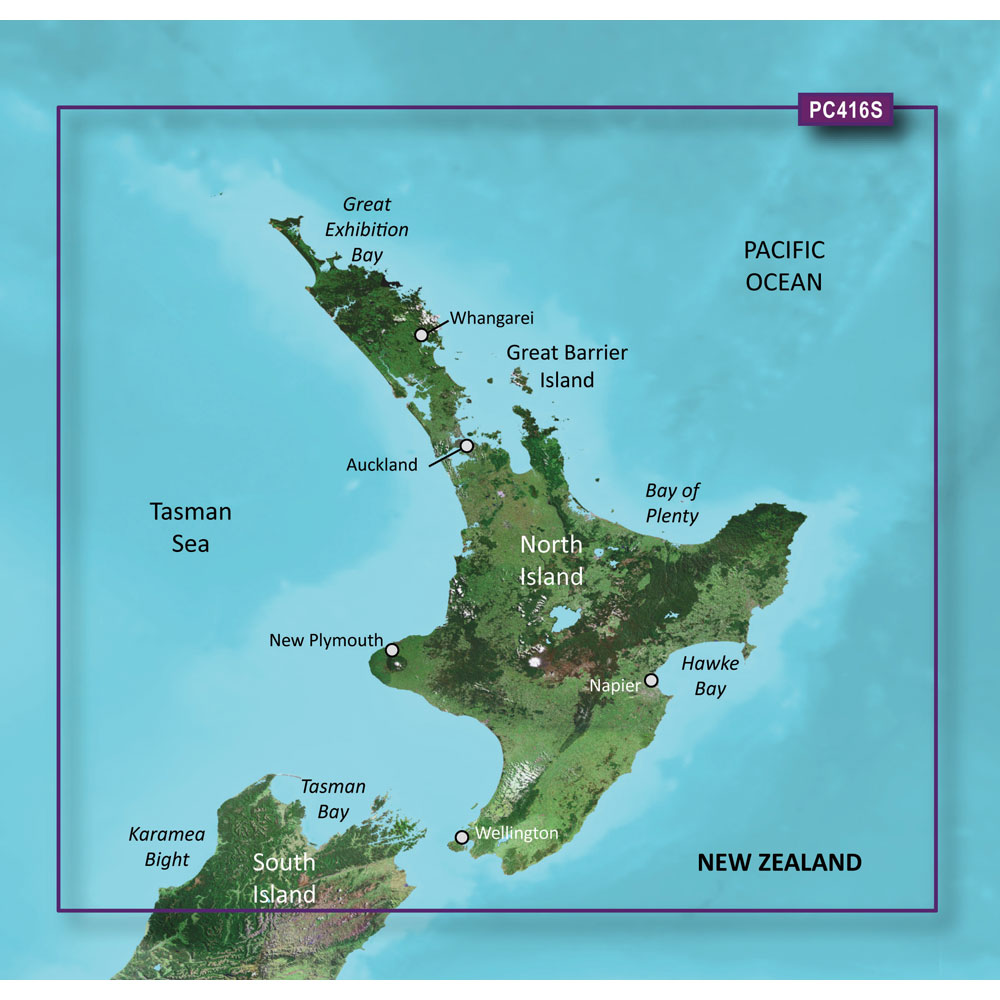
Garmin BlueChart Coastal Chart, New Zealand North Coast, Auto Guidance, 1 ft Contours
Overview
The Garmin BlueChart g3 HD is an electronic chart for New Zealand North coastal waters, sold as either BlueChart g3 or BlueChart g3 Vision and delivered on a preprogrammed microSD/SD card or as a downloadable chart.
Coverage wraps the full coastline of the North Island (including the Three Kings Islands) and extends into the northernmost part of the South Island, from Cape Foulwind to Cape Campbell, including Nelson. On supported Garmin chartplotters, you get navigation detail like aids to navigation, spot soundings, depth contours, tides, currents, and port-level detail for harbors and marinas.
For reading bottom structure at a glance, the chart includes Depth Range Shading with up to 10 depth ranges and areas with up to 1-foot contours. Vision versions add extra chart layers such as relief shading, satellite imagery, and 3D chart views.
Key features
- New Zealand North coverage: entire North Island coast plus northern South Island from Cape Foulwind to Cape Campbell, including Nelson
- Works with compatible Garmin chartplotters that support BlueChart g3 mapping; card versions require an available microSD or SD card slot
- Navigation content includes aids to navigation, tides, currents, spot soundings, depth contours, and detailed harbor and marina information
- Depth Range Shading supports up to 10 depth ranges to help you highlight target depths while underway
- Up to 1-foot contours in covered areas for clearer bottom definition around structure, channels, and tight inshore water
- Shallow Water Shading can be set to visually mark water you want to avoid based on your chosen depth threshold
- BlueChart g3 Vision adds premium layers including relief shading, satellite imagery, and 3D chart views (MarinerEye and FishEye)
- Format options include a preprogrammed microSD/SD card or a download that is loaded using Garmin Express
Variants
This chart is offered in multiple configurations so you can match the chart layer set and delivery method to your plotter and how you prefer to manage charts.
What changes between variants is the chart tier (BlueChart g3 versus BlueChart g3 Vision) and the format (preprogrammed card versus download). All variants are for the same New Zealand North coverage area.
- 010-C0874-20: BlueChart g3, SD card format. Preprogrammed media is a straightforward plug-in option when you want the chart available as soon as the card is inserted.
- 010-D0546-00: BlueChart g3, download format. Download delivery is loaded through Garmin Express, which is useful when you prefer managing charts from a computer.
- 010-C0874-00: BlueChart g3 Vision, SD card format. Vision adds extra viewing layers like relief shading, satellite imagery, and 3D chart views while keeping the same regional coverage.
- 010-D0524-00: BlueChart g3 Vision, download format. This keeps the Vision feature set while using Garmin Express for installation instead of a preprogrammed card.
Compatibility and fit
Confirm your chartplotter supports BlueChart g3 charts (and Vision layers if you choose a Vision variant) and that it has the correct media slot for the card format you are buying. For card-based versions, the unit reads the chart directly from the inserted card, so the card typically stays in the plotter while you are using the mapping.
If you are buying the download format, plan on using Garmin Express during setup. It helps to have a stable internet connection during the download and enough time dockside to complete the install before you head out.
Installation and setup
For the preprogrammed microSD/SD card format, power the chartplotter down, insert the card into the chart slot, and then power up so the plotter can index the chart. Once recognized, the chart can be selected from the chartplotter’s chart settings like any other map source.
For download variants, follow the Garmin Express workflow to install the chart to the supported storage your setup requires. After installation, verify the chart is visible on the plotter and zoom into a known local harbor to confirm you are viewing the correct region.
Use on board
This chart is a good match for skippers running the New Zealand North coast who want local detail for coastal passages, harbor approaches, and day-to-day navigation around islands and headlands. It also suits anglers who spend time working contour lines and structure, where tighter contour detail and depth shading help with quick decisions while drifting or trolling.
Depth Range Shading and shallow-water highlighting are especially handy when you are moving between anchorages or feeling your way into unfamiliar bays. Vision layers add perspective-style views and imagery that can make identifying marinas, entrances, and surrounding terrain faster on a busy screen.
We ship all in-store (FL) stock orders the same day if placed before 3 PM EST, Monday through Friday. Orders placed after this time will ship the next business day. Orders fulfilled from other warehouses or manufacturers may not ship the same day. If an item is out of stock, we will notify you promptly.
Related Products

Garmin BlueChart Coastal Chart, New Zealand South, Auto Guidance

Garmin BlueChart Coastal Chart, Iceland to Orkney, Auto Guidance, 1 ft Contours
Garmin BlueChart Coastal Chart, Ireland West Coast, Auto Guidance

Garmin BlueChart Italy West Coast Coastal Chart, Auto Guidance

Garmin BlueChart HD Coastal Chart, Spain Mediterranean Coast, Auto Guidance