


Garmin Standard Mapping Florida East Pen Premium microSD/SD Card, Coastal Aerial Overlay, Wildlife Management Areas, Offshore Lease Blocks

-
Perfect Fit, Guaranteed
Get the right part every time
-
Expert Support
Our in-house specialists know our products inside and out
-
Enhanced Value & Service
We go beyond the sale with professional and balanced services
-
Wordwide Delivery
Enjoy hassle-free worldwide delivery
Garmin Standard Mapping Florida East Pen Premium microSD/SD Card, Coastal Aerial Overlay, Wildlife Management Areas, Offshore Lease Blocks

Garmin Standard Mapping Florida East Pen Premium microSD/SD Card, Coastal Aerial Overlay, Wildlife Management Areas, Offshore Lease Blocks
Overview
The Garmin 010-C1199-00 is a Standard Mapping electronic chart card for the Florida East Peninsula in the Premium edition, supplied on microSD/SD media for use in compatible chartplotters.
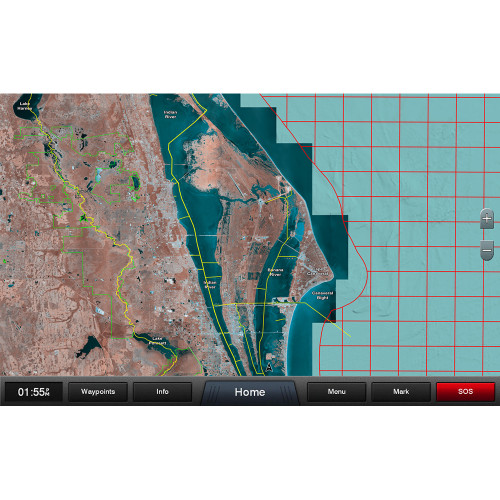
It adds a statewide coastal aerial overlay with high-resolution imagery and local names for waterways and land features, which helps when you are running the ICW, working your way through tight marsh cuts, or lining up a familiar shoreline at night or in haze. The chart also marks Wildlife Management Areas and Offshore Lease Areas, and it highlights offshore field lease blocks with outlines and labels.
Key features
- Florida East Peninsula coverage in the Standard Mapping Premium format (microSD/SD card media).
- Statewide coastal aerial overlay with high-resolution imagery.
- Local names for waterways and land features shown on the map.
- Wildlife Management Areas outlined for quick visual reference.
- Offshore Lease Areas shown, plus offshore field lease blocks outlined with labels.
- Recommended routes through marsh areas are marked with a highlighted path for easier track planning.
- Works as an add-on chart layer for chartplotters that support Standard Mapping cards.
Compatibility and fit
This chart is region-specific, so it is intended for boaters who spend time on the Florida East Peninsula coast and nearby waters. Before purchase, confirm your chartplotter supports Standard Mapping charts and has the correct card slot for the media your unit uses (microSD or full-size SD).
If your helm display is older, having current software matters for reading chart cards and displaying photo overlays smoothly. If the unit does not recognize the card, the first checks are slot type, software level, and whether the card is fully seated in the spring-loaded tray.
Installation and setup
Power the chartplotter down, insert the chart card, then restart the unit so it can index the mapping. After it loads, select the chart source or map type on the plotter and enable the photo or satellite layer setting if your unit requires it for Standard Mapping overlays.
For best day-to-day use, leave the card in the plotter while underway so chart drawing and overlays remain available. Keep the card door or gasketed cover properly closed to limit spray and salt intrusion at the helm.
Use cases on board
This card is a good match for coastal cruisers, guides, and anglers who want photo-style shoreline context while navigating the Florida east coast, especially where marsh routes and shallow backwaters make chart interpretation feel busy. It is also useful for offshore runs where lease blocks and clearly labeled areas help with situational awareness.
As with any electronic cartography, treat it as one tool in the stack and navigate with appropriate lookout practices and local conditions in mind.
Maintenance and care
Handle the card with dry hands, avoid touching the contacts, and store it in a protective case when it is not in the plotter. If the helm is exposed, reduce how often you remove and reinsert the card to limit wear on the slot and keep salt residue from building up on the contacts.
We ship all in-store (FL) stock orders the same day if placed before 3 PM EST, Monday through Friday. Orders placed after this time will ship the next business day. Orders fulfilled from other warehouses or manufacturers may not ship the same day. If an item is out of stock, we will notify you promptly.
Related Products

Garmin Standard Mapping Florida West Pen microSD/SD Card, Premium, Coastal Aerial Overlay, Offshore Elevation Shading, Local Waterway Names, Wildlife Management Areas, Offshore Lease Areas

Garmin Standard Mapping Florida West Peninsula microSD/SD Card, Professional, Coastal Aerial Overlay, State/Federal Boundaries, Wildlife Management Areas, Offshore Lease Areas


Garmin Standard Mapping Chart Card, Louisiana West Professional, microSD/SD, High-Resolution Coastal Aerial Overlay, Wildlife Management Areas, Offshore Lease Areas

Garmin Standard Mapping Mississippi Sound Electronic Chart Card, Premium, microSD/SD, High-Resolution Coastal Aerial Overlay, Recommended Routes, Local Waterway Names, Wildlife Management Areas, Offshore Lease Areas, Offshore Field Lease Blocks
Out of stock

Garmin Standard Mapping Louisiana Central Chart microSD/SD Card, Premium, Statewide Coastal Aerial Overlay, Local Waterway Names, Recommended Routes, Offshore Lease Blocks, Wildlife Management Areas
Out of stock