


Garmin BlueChart Coastal and Inland Chart, Oslo-Skagerrak-Haugesund, Garmin and Navionics Data, Auto Guidance

-
Perfect Fit, Guaranteed
Get the right part every time
-
Expert Support
Our in-house specialists know our products inside and out
-
Enhanced Value & Service
We go beyond the sale with professional and balanced services
-
Wordwide Delivery
Enjoy hassle-free worldwide delivery
Garmin BlueChart Coastal and Inland Chart, Oslo-Skagerrak-Haugesund, Garmin and Navionics Data, Auto Guidance

Garmin BlueChart Coastal and Inland Chart, Oslo-Skagerrak-Haugesund, Garmin and Navionics Data, Auto Guidance
Overview
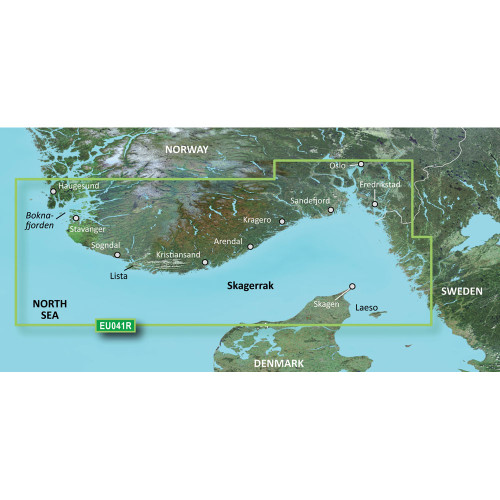
The Garmin BlueChart g3 Vision HD electronic chart for Oslo-Skagerak-Haugesund is a Garmin cartography region offered in BlueChart g3 Vision (VEU041R) and BlueChart g3 (HXEU041R) formats for compatible Garmin chartplotters that read microSD or SD cards.
This chart area covers the Norwegian and Swedish coasts from Flekkefjord to Göteborg, and includes key waters around the Oslofjord and the Skagerrak. It also extends to the northern tip of Denmark including Skagen and Frederikshavn, plus the island of Laeso. On the water you get Auto Guidance route suggestions based on your settings, Depth Range Shading for up to 10 depth ranges, and detailed contours down to 1 foot in supported areas.
BlueChart g3 Vision adds premium chart layers such as high-resolution satellite imagery overlay, aerial photography for many ports and marinas, and 3D views (FishEye and MarinerEye) when your chartplotter supports those chart features. The physical card option is a plug-in chart card, while the download option is installed to a microSD or SD card using Garmin Express.
Key features
- Coverage for the Oslo-Skagerak-Haugesund region, including the Norwegian and Swedish coasts from Flekkefjord to Göteborg, plus Skagen, Frederikshavn, and the island of Laeso
- Integrated Garmin and Navionics content for a familiar chart presentation and coastal detail
- Auto Guidance route suggestions that use your preferred depth and overhead clearance settings
- Depth Range Shading for up to 10 depth ranges to make target depths easier to spot
- Up to 1-foot contours in supported areas for tighter navigation and structure-focused fishing
- Shallow Water Shading with a user-defined depth highlight to keep shoals obvious at a glance
- On BlueChart g3 Vision options: satellite imagery overlay, 3D FishEye and MarinerEye views, and aerial photos of many ports and marinas where available
Variants
This chart region is offered in multiple configurations so you can match your chart family and delivery format to your Garmin setup.
What changes between variants is the chart family (BlueChart g3 Vision versus BlueChart g3) and how you receive it (pre-programmed card versus download). The mapped area remains the Oslo-Skagerak-Haugesund coverage, with the region code shown for each chart family.
- 010-C0778-00: BlueChart g3 Vision (VEU041R), SD Card format. This is the pre-programmed chart card option and includes the premium chart layers supported by your plotter.
- 010-D0449-00: BlueChart g3 Vision (VEU041R), Download format. The download is installed to a microSD or SD card using Garmin Express, so you will want an empty card set aside for this chart.
- 010-C0778-20: BlueChart g3 (HXEU041R), SD Card format. This is the standard BlueChart g3 chart card for the same area when you do not need the Vision-specific views.
- 010-D0292-00: BlueChart g3 (HXEU041R), Download format. The download installs to a microSD or SD card through Garmin Express and is meant for use in a compatible Garmin chartplotter.
Compatibility and fit
These charts are for Garmin chartplotters that support BlueChart g3 and that have a microSD or SD card slot. If you are choosing a BlueChart g3 Vision variant, premium items like satellite imagery overlay, aerial photos, and 3D chart views depend on the chartplotter model and its chart feature support.
For download variants, the chart is installed to a card using Garmin Express rather than arriving as a pre-programmed card. Plan on using a dedicated microSD or SD card for the install.
Installation and setup
For the card format, insert the chart card into the chartplotter and select the chart from the chart or navigation pages. Leave the card in place while you are using the chart data.
For the download format, use Garmin Express on a computer to install the chart to a microSD or SD card, then insert that card into the chartplotter. Keeping the card labeled with the region code helps when you rotate between cruising areas.
Who it suits on board
This chart region makes sense for skippers running the Norway and Sweden coastline, transiting the Skagerrak, or working in and out of the Oslofjord where you want coastal detail and route-planning support close to shore. Anglers who rely on contour detail and depth shading to follow structure will also get practical value from the high-detail areas of the chart.
We ship all in-store (FL) stock orders the same day if placed before 3 PM EST, Monday through Friday. Orders placed after this time will ship the next business day. Orders fulfilled from other warehouses or manufacturers may not ship the same day. If an item is out of stock, we will notify you promptly.
Related Products
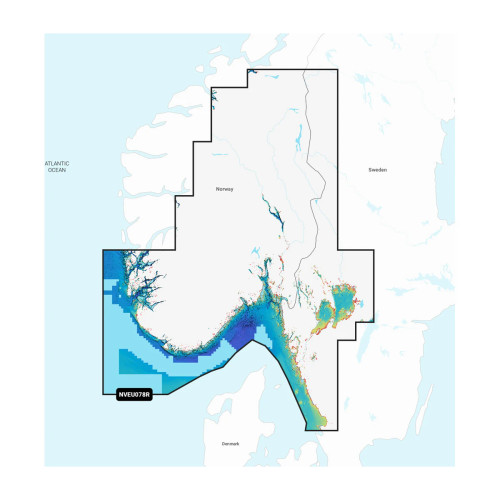
Garmin Navionics Marine Chart, EU078R, Oslo Skagerrak & Haugesund

Garmin BlueChart Coastal Chart, Mackay to Twofold Bay, Auto Guidance, Navionics Data

Garmin BlueChart g3 Coastal Chart, Australia Geraldton to Darwin, Integrated Navionics Data, Auto Guidance

Garmin BlueChart Coastal Chart, Southern Bahamas, Explorer Charts Data, Auto Guidance

Garmin BlueChart Coastal Charts, Polynesia, Auto Guidance