


Garmin Standard Mapping Emerald Coast Professional microSD/SD Card, Coastal Aerial Overlay, State/Federal Offshore Boundaries


-
Perfect Fit, Guaranteed
Get the right part every time
-
Expert Support
Our in-house specialists know our products inside and out
-
Enhanced Value & Service
We go beyond the sale with professional and balanced services
-
Wordwide Delivery
Enjoy hassle-free worldwide delivery
Garmin Standard Mapping Emerald Coast Professional microSD/SD Card, Coastal Aerial Overlay, State/Federal Offshore Boundaries
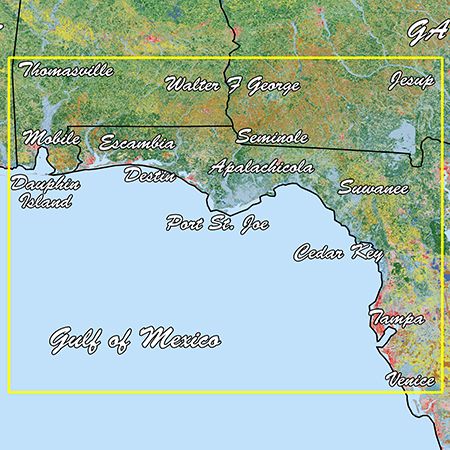
Garmin Standard Mapping Emerald Coast Professional microSD/SD Card, Coastal Aerial Overlay, State/Federal Offshore Boundaries
Overview
The Garmin 010-C1191-00 is a Standard Mapping Professional electronic chart card for the Emerald Coast that loads into compatible Garmin chartplotters through a microSD/SD card slot. It adds sectioned coastal aerial imagery and labeled waterways and land features so you can visually confirm where you are when running nearshore, working through passes, or picking your way around bay systems.
On this region card, oyster lease areas are outlined in white, artificial reefs are marked with a white dot, and offshore boundaries show when you cross between state and federal waters. Wildlife Management Areas and Offshore Lease Areas are labeled on the chart, which is helpful when planning routes and avoiding restricted zones.
This mapping is a good fit for skippers who spend time on the Emerald Coast and want more on-screen context around lease areas, reefs, and boundary lines without changing their onboard workflow.
Key features
- Preloaded Emerald Coast mapping on a microSD/SD chart card for use in compatible Garmin chartplotters
- Sectioned coastal aerial overlay with high-resolution imagery plus local waterway and land feature names
- Oyster lease areas shown with clear white outlines for quick recognition
- Artificial reef locations identified with a white dot on the chart view
- State and federal offshore boundaries displayed to make transitions obvious underway
- Wildlife Management Areas and Offshore Lease Areas labeled on the map
Compatibility and fit
This card is intended for Garmin chartplotters that support Standard Mapping E-Card charts and read mapping from the unit’s memory card slot. GPSMAP and ECHOMAP families commonly use this media format, but compatibility depends on the specific model and software level.
If your plotter does not recognize chart cards or does not support this chart type, the mapping will not load, even though the card fits the slot.
Installation and setup
Insert the card into the chartplotter’s microSD or SD slot, power up the unit, and select the chart source in the mapping pages. The plotter reads the mapping from the card, so the card needs to stay installed while you are using the Emerald Coast data.
For best on-screen clarity, adjust chart detail and overlay visibility in the plotter menus to match your zoom level and the amount of information you want displayed.
Care and handling
Keep the card contacts clean and dry, and store the card in its case when it is not in the plotter. Avoid leaving the slot open during washdowns or in heavy spray to reduce the chance of corrosion on the card and card reader.
We ship all in-store (FL) stock orders the same day if placed before 3 PM EST, Monday through Friday. Orders placed after this time will ship the next business day. Orders fulfilled from other warehouses or manufacturers may not ship the same day. If an item is out of stock, we will notify you promptly.
Related Products

Garmin Standard Mapping Florida West Peninsula microSD/SD Card, Professional, Coastal Aerial Overlay, State/Federal Boundaries, Wildlife Management Areas, Offshore Lease Areas

Garmin Standard Mapping Louisiana East Professional Chart Card, microSD/SD, High-Resolution Aerial Overlay, Oyster Leases, Artificial Reefs, State/Federal Offshore Boundaries
Out of stock


Garmin Standard Mapping Chart Card, Louisiana West Professional, microSD/SD, High-Resolution Coastal Aerial Overlay, Wildlife Management Areas, Offshore Lease Areas

Garmin Standard Mapping microSD/SD Chart Card, Florida Keys Classic, Coastal Aerial Overlay, Offshore Elevation Shading, Local Names
Out of stock

Garmin Standard Mapping Louisiana Central Chart microSD/SD Card, Premium, Statewide Coastal Aerial Overlay, Local Waterway Names, Recommended Routes, Offshore Lease Blocks, Wildlife Management Areas
Out of stock