


Garmin BlueChart Coastal Chart, Greenland, Auto Guidance


-
Perfect Fit, Guaranteed
Get the right part every time
-
Expert Support
Our in-house specialists know our products inside and out
-
Enhanced Value & Service
We go beyond the sale with professional and balanced services
-
Wordwide Delivery
Enjoy hassle-free worldwide delivery
Garmin BlueChart Coastal Chart, Greenland, Auto Guidance
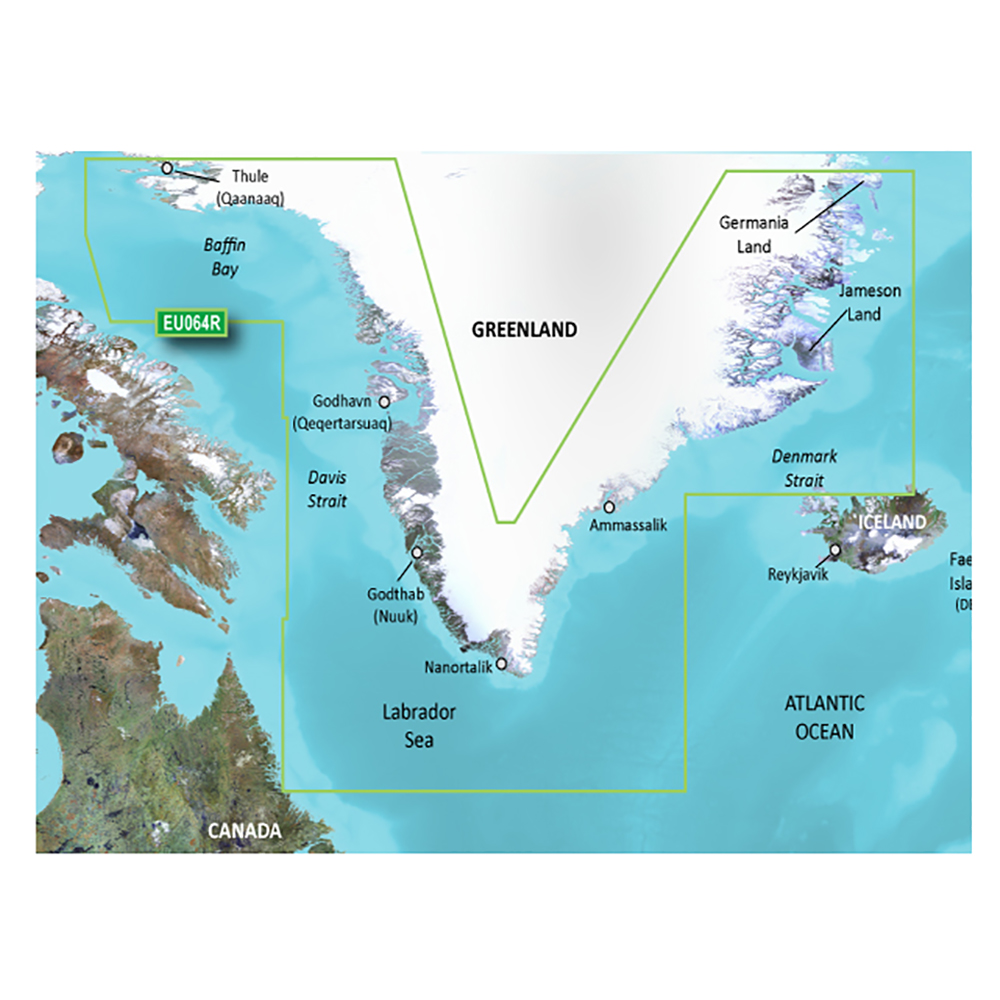
Garmin BlueChart Coastal Chart, Greenland, Auto Guidance
Overview
The Garmin BlueChart g3 Vision HD VEU064R is an electronic chart for Greenland that runs on compatible Garmin chartplotters using a microSD/SD card slot, either from a pre-programmed card or from a downloaded chart installed to a card.
Coverage focuses on Greenland’s west coast from Thule (Qaanaaq), around the southern tip, to Lindenow Fjord (Kangerlussuatsiaq) on the southeast coast, with detail for places such as Ikerasak, Sisimiut, Qeqertarsuaq, Nuuk, Qaqortoq, and Nanortalik.
Across the range you can select BlueChart g3 or BlueChart g3 Vision. BlueChart g3 Vision adds extra chart layers such as satellite imagery overlays and 3D perspectives, along with Depth Range Shading for up to 10 depth ranges, Shallow Water Shading at a user-defined depth, and contours down to 30 cm (1 ft) where the local data supports it.
Key features
- Greenland coverage from Thule (Qaanaaq) around the southern tip to Lindenow Fjord (Kangerlussuatsiaq), including major towns and harbors shown within the region
- Works on compatible Garmin chartplotters that support BlueChart g3 or BlueChart g3 Vision and use a microSD/SD mapping slot
- Auto Guidance route planning on supported plotters uses your entered depth and overhead clearance to calculate a suggested path for review
- BlueChart g3 Vision option adds satellite imagery overlays plus 3D MarinerEye and FishEye views for more visual context near shore
- BlueChart g3 Vision option includes Depth Range Shading for up to 10 ranges and Shallow Water Shading at a user-set depth to make shallow areas easier to spot
- Up to 30 cm (1 ft) contours are available where chart data supports it, which helps when reading bottom shape for anchoring and fishing
- Some areas include relief shading layers that can be downloaded through the ActiveCaptain app when supported
- Download format installs through Garmin Express to a micro/SD card, and only one chart can be installed to a single card
Variants
This product is offered in multiple configurations for the same Greenland chart coverage, with differences in chart tier and how you receive it.
The two attributes that vary are the BlueChart version (BlueChart g3 Vision or BlueChart g3) and the format (pre-programmed SD card or a download that is installed to a micro/SD card through Garmin Express).
- 010-C1001-00: BlueChart g3 Vision, SD Card. The chart data runs directly from the card once it is inserted into the chartplotter.
- 010-D0462-00: BlueChart g3 Vision, Download. The chart is installed to a micro/SD card using Garmin Express and is unlocked to one compatible device.
- 010-C1001-20: BlueChart g3, SD Card. A straightforward plug-in chart card format for the region on compatible Garmin plotters.
- 010-D0305-00: BlueChart g3, Download. The chart is installed to a micro/SD card using Garmin Express and is unlocked to one compatible device.
Compatibility and fit
Confirm your chartplotter supports BlueChart g3 and or BlueChart g3 Vision before ordering, since not every Garmin display can show every premium layer. A microSD/SD card slot is required for card use, and the download format is associated with the device you select during installation.
If you have multiple Garmin displays on a Garmin marine network, charts can be viewed across the network when the mapping card is in the correct chartplotter. With download charts, the maps only appear and share when the card is in the device they were unlocked to.
Installation and setup
For the SD card format, insert the card into the chartplotter’s microSD/SD slot and select the chart layer from your mapping settings. Keep the card in place while you want access to the chart data.
For the download format, use Garmin Express on a computer to install the chart to a micro/SD card, then insert that card into the chartplotter. Download installs are one chart per card, so plan a dedicated card if you carry multiple regions.
Use on board
This chart is a practical match for boats heading into Greenland waters that want local coastline detail for route planning, harbor approaches, and anchorage scouting. The g3 Vision option is a better fit when you value the extra visual layers and 3D perspectives when working close to shore.
Auto Guidance is a planning aid and should be cross-checked against conditions, notices, and safe seamanship before running a route.
We ship all in-store (FL) stock orders the same day if placed before 3 PM EST, Monday through Friday. Orders placed after this time will ship the next business day. Orders fulfilled from other warehouses or manufacturers may not ship the same day. If an item is out of stock, we will notify you promptly.
Related Products

Garmin BlueChart Coastal Charts, Polynesia, Auto Guidance

Garmin BlueChart Coastal Chart, Bay of Biscay, Auto Guidance

Garmin BlueChart Coastal Charts, Southwest Caribbean, Auto Guidance

Garmin BlueChart Coastal Chart, New Zealand South, Auto Guidance

Garmin BlueChart Coastal Chart, Italy Southwest & Tunisia, Auto Guidance