


Garmin BlueChart Coastal Charts, Timor Leste/New Guinea Coverage


-
Perfect Fit, Guaranteed
Get the right part every time
-
Expert Support
Our in-house specialists know our products inside and out
-
Enhanced Value & Service
We go beyond the sale with professional and balanced services
-
Wordwide Delivery
Enjoy hassle-free worldwide delivery
Garmin BlueChart Coastal Charts, Timor Leste/New Guinea Coverage
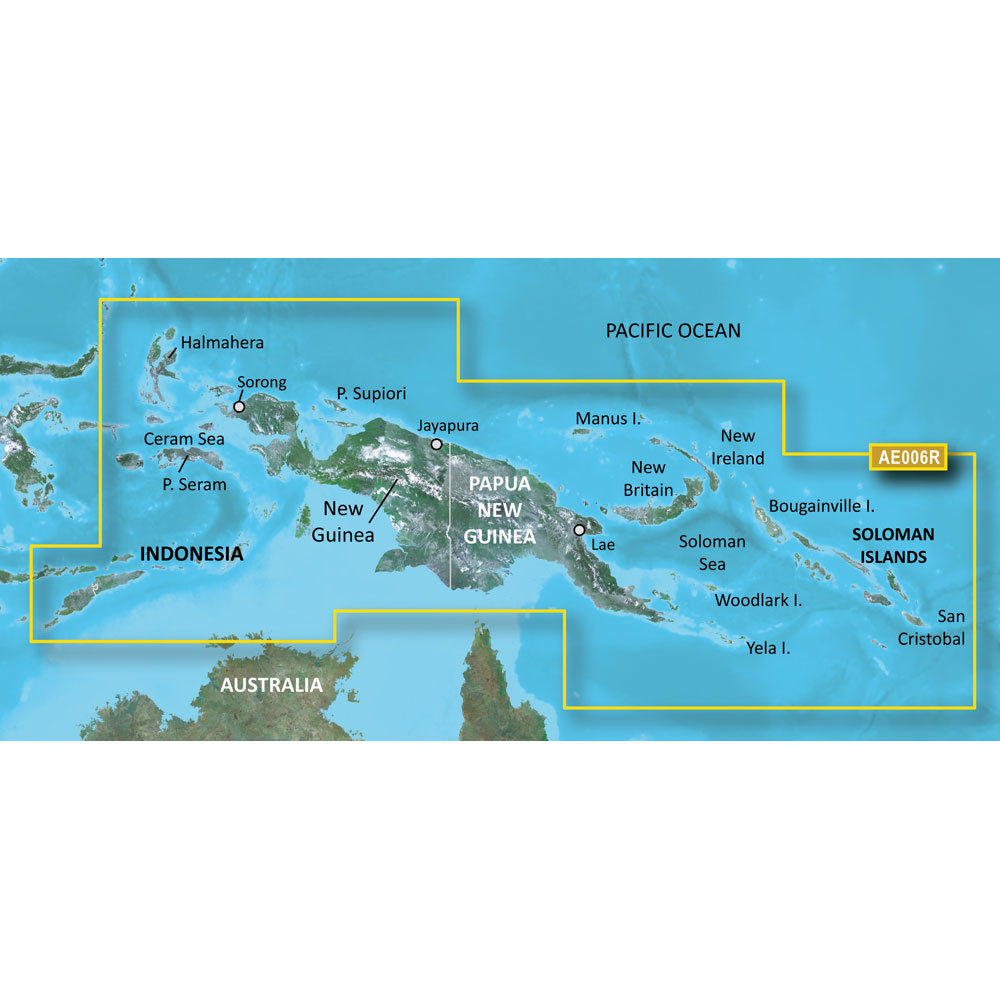
Garmin BlueChart Coastal Charts, Timor Leste/New Guinea Coverage
Overview
The Garmin BlueChart g3 Vision HD VAE006R Timor Leste/New Guinea is an electronic chart region for compatible Garmin chartplotters, covering Indonesia southeast and east of Sulawesi including Timor, all of New Guinea, the Solomon Islands, Osprey Reef, nearly all of Bathurst and Melville Islands, and the Cobourg Peninsula of Australia.
On the water, this chart adds detailed coastal navigation plus premium chart layers when supported by your plotter, including route suggestions with Auto Guidance (based on your selected depth and overhead clearance), depth and shallow-water shading, and 3D and photo-style views that help when approaching unfamiliar harbors.
This is a good match for skippers running Garmin MFDs in the Timor Sea, PNG, and surrounding island chains who want local chart detail on board for coastal cruising, offshore hops between islands, and fishing structure work where contour detail matters.
Key features
- Regional coverage for Timor Leste and New Guinea waters, with ports including Ambon and Ternate (Indonesia), Snake Bay (Australia), Lae, Rabaul and Port Moresby (PNG), and Honiara (Solomon Islands)
- Auto Guidance route suggestions using your selected depth and overhead clearance
- Depth Range Shading for up to 10 depth ranges, plus Shallow Water Shading at a user-defined depth
- Up to 1 ft contours in supported areas for clearer bottom detail and fishing structure
- Premium visual layers on Vision versions, including high-resolution satellite imagery, MarinerEye and FishEye 3D views, and aerial photography of many ports and marinas
- Relief shading support where available, with some regions delivered through downloadable layers via the ActiveCaptain app
- Available as a preprogrammed card for SD and microSD slots, or as a computer download for loading to a compatible card
Variants
This chart region is offered in multiple configurations, depending on whether you need BlueChart g3 or BlueChart g3 Vision, and whether you prefer a physical card or a download.
BlueChart g3 Vision adds premium layers such as satellite imagery, 3D perspectives, aerial photos, and relief shading support where available. BlueChart g3 focuses on core navigation content with chart detail and route suggestions, without the extra Vision visual layers.
- 010-C0881-00: BlueChart g3 Vision, SD Card format. A preprogrammed card you insert into a compatible chartplotter slot to access the region.
- 010-D0368-00: BlueChart g3 Vision, Download format. Delivered through Garmin Express for loading to a compatible card, then used in your chartplotter.
- 010-C0881-20: BlueChart g3, SD Card format. A preprogrammed card for core chart coverage and navigation features on supported Garmin plotters.
- 010-D0332-00: BlueChart g3, Download format. Installed with Garmin Express to a compatible card for use on a supported Garmin device.
Compatibility and fit
Confirm your Garmin chartplotter supports BlueChart g3 or BlueChart g3 Vision cartography and has an SD or microSD card slot that matches the format you are buying. Some microSD installations use an adapter, depending on your unit.
Downloadable chart options are typically unlocked to a single compatible Garmin device during installation, so plan the install on the chartplotter you intend to use on board.
Installation and setup
For card versions, power down the chartplotter, insert the card into the chart slot, then boot up and enable the chart layer from the chart setup or chart selection menu.
For download versions, use Garmin Express on a computer to place the chart data onto a compatible card, then insert that card into the chartplotter. If your unit supports ActiveCaptain features, you can also manage certain downloadable layers where available once the chart is recognized by the plotter.
Use notes on board
Auto Guidance provides a suggested path based on your settings and available chart data. It does not replace good seamanship, updated local notices, and visual navigation in reefs, passes, and unlit areas.
We ship all in-store (FL) stock orders the same day if placed before 3 PM EST, Monday through Friday. Orders placed after this time will ship the next business day. Orders fulfilled from other warehouses or manufacturers may not ship the same day. If an item is out of stock, we will notify you promptly.
Related Products
Garmin BlueChart Coastal Chart, Gulf & Red Sea Coverage

Garmin BlueChart Electronic Chart, For Garmin Chartplotters, Western Africa Coastal Charts

Garmin BlueChart Coastal Chart, VPC018R New Caledonia to Fiji

Garmin BlueChart Coastal Chart, For Garmin Chartplotters, Yellow Sea

Garmin BlueChart Coastal Chart, Greenland, Auto Guidance