


Garmin BlueChart g3 Vision Electronic Chart, VPC021R, Australia (Mackay to Esperance), Auto Guidance, Depth Range Shading (10 Depth Ranges), 1 ft Contours, 3D MarinerEye and FishEye Views, High-Resolution Satellite Imagery


-
Perfect Fit, Guaranteed
Get the right part every time
-
Expert Support
Our in-house specialists know our products inside and out
-
Enhanced Value & Service
We go beyond the sale with professional and balanced services
-
Wordwide Delivery
Enjoy hassle-free worldwide delivery
Garmin BlueChart g3 Vision Electronic Chart, VPC021R, Australia (Mackay to Esperance), Auto Guidance, Depth Range Shading (10 Depth Ranges), 1 ft Contours, 3D MarinerEye and FishEye Views, High-Resolution Satellite Imagery
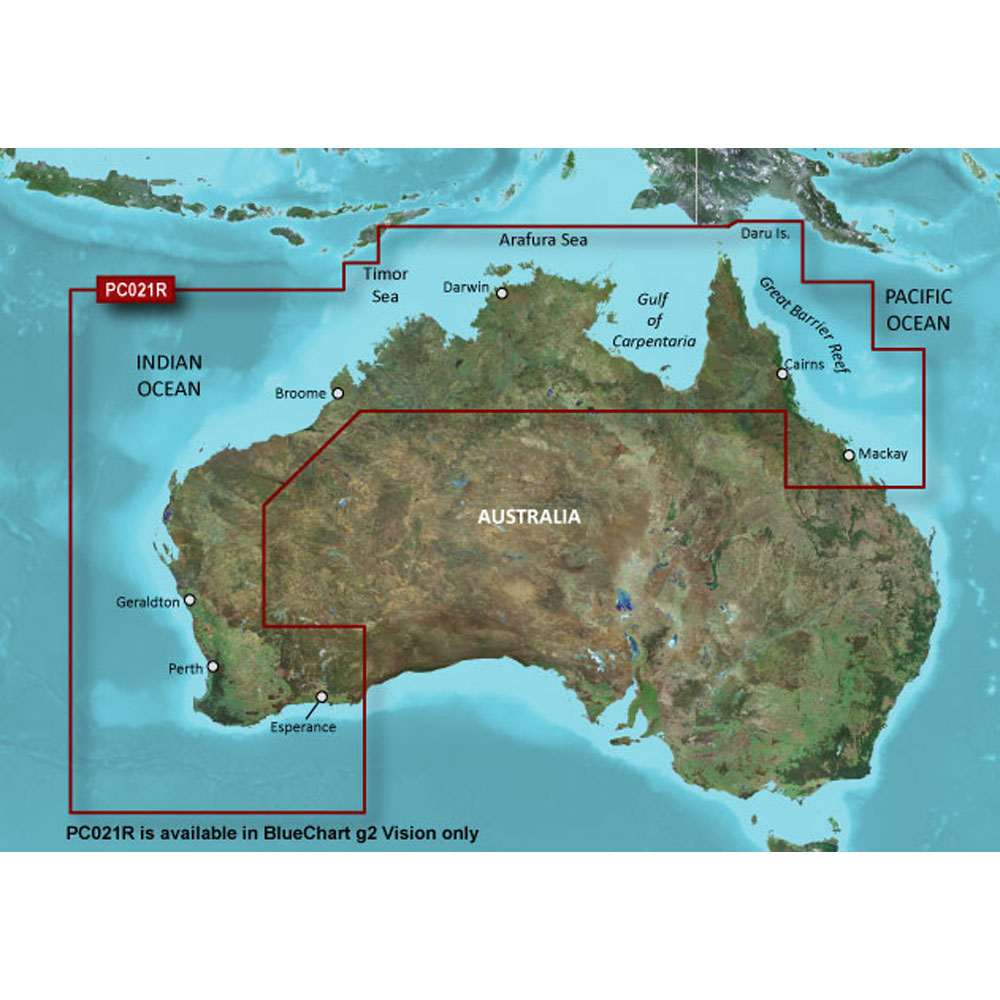
Garmin BlueChart g3 Vision Electronic Chart, VPC021R, Australia (Mackay to Esperance), Auto Guidance, Depth Range Shading (10 Depth Ranges), 1 ft Contours, 3D MarinerEye and FishEye Views, High-Resolution Satellite Imagery
Overview
The Garmin BlueChart g3 Vision HD VPC021R is an electronic chart for compatible Garmin chartplotters covering Australia’s northern and western coasts from Esperance to Mackay. It includes key areas such as Perth, Geraldton, Broome, Darwin, Cairns, the Gulf of Carpentaria, the Great Barrier Reef, and Port Moresby in PNG.
This region adds premium chart layers and views that help with day to day navigation and fishing workups, including MarinerEye and FishEye perspectives. Depth Range Shading supports up to 10 depth ranges, and the chart detail can show up to 1-foot contours where available, which helps you read bottom shape and tighter areas like canals and port plans.
Key features
- VPC021R coverage from Esperance to Mackay, including Perth, Geraldton, Broome, Darwin, Cairns, the Gulf of Carpentaria, the Great Barrier Reef, and Port Moresby (PNG)
- MarinerEye and FishEye 3D-style chart views for looking at structure above and below the waterline
- Depth Range Shading for up to 10 depth ranges, plus shallow water shading you can set to your preferred depth
- Up to 1-foot contours shown where available for clearer bottom definition when navigating or searching structure
- Relief shading that uses color and shadow to make seafloor shape easier to interpret at a glance
- Satellite imagery overlays and aerial photography for many ports, harbors, marinas, and landmarks
- Auto Guidance can generate a suggested route when your vessel dimensions and clearances are entered on supported units
- Offered as a preprogrammed microSD/SD card or as a downloadable format
Variants
This chart is available in more than one delivery format so you can match how you prefer to purchase and load cartography.
Both options refer to the same VPC021R chart region; the difference is whether you receive a preprogrammed card or a download that is loaded to a card and activated for a specific device.
- 010-C0754-00: Format microSD/SD. A preprogrammed card that goes straight into the chartplotter’s card slot for immediate use.
- 010-D0515-00: Format Download. Delivered digitally and loaded to a microSD/SD card, with activation tied to the chartplotter it was purchased for.
Compatibility and fit
This product is for Garmin chartplotters that support BlueChart g3 Vision cartography and use a microSD or SD chart slot. Premium layers like 3D views, relief shading, and Auto Guidance show based on what your specific unit supports and how it is configured.
On Garmin Marine Network systems, a single chart card can be shared across the network when it is inserted in the device that is providing cartography to the network. With the downloadable format, sharing works when the card is in the device it is unlocked to.
Installation and setup
For the microSD/SD card version, insert the card into the chart slot with the unit powered off, then power up and allow the plotter to finish loading charts before getting underway.
For the download version, plan on loading the chart to a microSD/SD card using Garmin desktop software before heading to the boat. Use one chart per card, and keep that card dedicated to the device it was activated for.
Use cases on board
This chart is a solid match for boats running the WA and NT coastline, transits into the Gulf of Carpentaria, or runs along the Queensland coast where you want 3D perspectives, satellite imagery, and contour detail in the same package. It also suits skippers who rely on depth shading to stay in a target band while coastal cruising or working fishing grounds.
Auto Guidance and 3D views are planning and situational tools, not a replacement for keeping a proper lookout and cross-checking conditions, notices, and local requirements on the water.
Maintenance and care
Keep the chart card clean and dry, and store it in a case when it is not in the plotter. Avoid handling the contacts with wet hands after a washdown, and do not remove the card while the unit is writing data or updating.
We ship all in-store (FL) stock orders the same day if placed before 3 PM EST, Monday through Friday. Orders placed after this time will ship the next business day. Orders fulfilled from other warehouses or manufacturers may not ship the same day. If an item is out of stock, we will notify you promptly.
Related Products

Garmin BlueChart g3 Vision HD Electronic Chart, VAW450S, The Gulf, Auto Guidance, 1 ft Contours, Depth Range Shading, Up to 10 Depth Ranges, MarinerEye and FishEye 3D Views, High-Resolution Satellite Imagery
Out of stock

Garmin BlueChart g3 Vision HD Electronic Chart, VEU467S Blackpool to Cardiff, For Garmin Chartplotters, Auto Guidance, 1 ft Contours, Depth Range Shading, High-Resolution Satellite Imagery, Aerial Photography, FishEye View, MarinerEye View

Garmin BlueChart g3 Vision VEU469S Electronic Chart, Stockholm & Mälaren, Auto Guidance, Depth Range Shading up to 10 Ranges, 1 ft Contours, Shallow Water Shading, High-Resolution Satellite Imagery, Aerial Photography, MarinerEye and FishEye 3D Views

Garmin BlueChart g3 Vision HD VCA019R Electronic Chart, Hecate Strait Coverage, Auto Guidance, Depth Range Shading, 10 Depth Ranges, 1 ft Contours, High-Res Satellite Imagery, FishEye and MarinerEye 3D Views

Garmin BlueChart g3 Vision HD Electronic Chart, VAF451S, Namibia to Knysna South Africa, Auto Guidance, 1 ft Contours, Depth Range Shading, 3D MarinerEye/FishEye, High-Resolution Satellite Imagery