


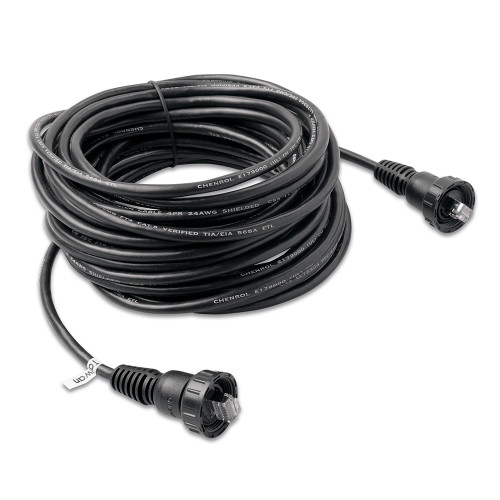
Garmin Marine Network to Fusion RJ45 Adapter Cable, For GPSMAP Series Chartplotters, For Fusion Stereos


-
Perfect Fit, Guaranteed
Get the right part every time
-
Expert Support
Our in-house specialists know our products inside and out
-
Enhanced Value & Service
We go beyond the sale with professional and balanced services
-
Wordwide Delivery
Enjoy hassle-free worldwide delivery
Garmin Marine Network to Fusion RJ45 Adapter Cable, For GPSMAP Series Chartplotters, For Fusion Stereos

Garmin Marine Network to Fusion RJ45 Adapter Cable, For GPSMAP Series Chartplotters, For Fusion Stereos
Overview
The Garmin Marine Network to Fusion Cables is an adapter cable that connects a Garmin Marine Network port to an RJ45 network port on a compatible Fusion stereo.
It is offered in two configurations: a 6 ft (1.8 m) cable with a large male Garmin Marine Network connector, and a 6 in (0.15 m) jumper with a small female Garmin Marine Network connector. Both versions terminate at the stereo end with an RJ45 male plug.
This is meant for installations where your Garmin side uses Garmin Marine Network cabling and your Fusion side expects RJ45. It is not a general-purpose Ethernet patch cable for standard network gear.
Key features
- Converts a Garmin Marine Network connection to an RJ45 male plug for compatible Fusion stereos
- Two connector configurations to match common Garmin Marine Network connector styles (large male or small female)
- Two cable lengths depending on configuration: 6 ft (1.8 m) or 6 in (0.15 m)
- Used to link GPSMAP series chartplotters with Garmin Marine Network ports to compatible Fusion stereos
Variants
This cable is offered in multiple configurations so the Garmin Marine Network end matches the connector style already present on your system.
The connector size and gender on the Garmin side vary by part number, along with the cable length. The Fusion side remains an RJ45 male plug.
- 010-12531-20: Configuration large male, 6 ft (1.8 m). This longer lead is suited to runs from a chartplotter or network switch area to the stereo mounting location.
- 010-12531-21: Configuration small female, 6 in (0.15 m). This short jumper is useful where you only need a compact transition behind the helm or inside an electronics enclosure.
Installation and setup
Plan the route so the cable is supported and protected from chafe. Use cushioned clamps or cable ties with mounts, keep it clear of sharp edges, and avoid tight bends right behind the connectors.
During installation, keep the connector ends clean and dry, line them up before seating, and avoid forcing anything if the fit does not feel right. Leave a small service loop so the stereo can be pulled for service without straining the cable.
Compatibility and fit
Confirm two things before ordering: your Garmin side must be a Garmin Marine Network port that matches the variant connector (large male or small female), and your Fusion stereo must have an RJ45 network port. The variant choice is about physical fit at the Garmin end and how much length you need between devices.
Use on board
This is a good match for boats with a Garmin GPSMAP setup that uses Garmin Marine Network and a Fusion stereo that needs an RJ45 network connection for system integration. It is commonly used on refits where a stereo is being added at the helm, or when a network layout needs a clean transition between connector styles without reworking existing cabling.
We ship all in-store (FL) stock orders the same day if placed before 3 PM EST, Monday through Friday. Orders placed after this time will ship the next business day. Orders fulfilled from other warehouses or manufacturers may not ship the same day. If an item is out of stock, we will notify you promptly.
Related Products

Garmin BlueNet Network to RJ45 Adapter Cable, For OneHelm and Fusion RJ45 Devices


Garmin Marine Network Adapter Cable, RJ45 Female to BlueNet Female


Garmin USB-C Adapter Cables, For GPSMAP 9000 Series Chartplotters


Fusion - Marine Network Cable

Garmin Marine Network Ethernet Cable, Large Connectors, RJ45