


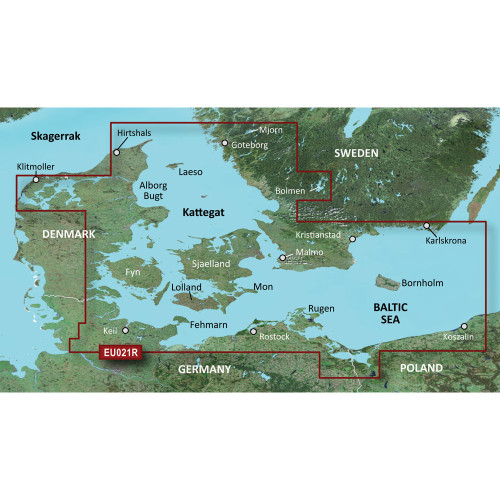
Garmin BlueChart g3 Coastal and Inland Chart, Denmark East to Sweden Southeast Coverage, Auto Guidance, Integrated Garmin and Navionics Data, Depth Range Shading Up to 10 Ranges, Up to 1' Contours, Shallow Water Shading

-
Perfect Fit, Guaranteed
Get the right part every time
-
Expert Support
Our in-house specialists know our products inside and out
-
Enhanced Value & Service
We go beyond the sale with professional and balanced services
-
Wordwide Delivery
Enjoy hassle-free worldwide delivery
Garmin BlueChart g3 Coastal and Inland Chart, Denmark East to Sweden Southeast Coverage, Auto Guidance, Integrated Garmin and Navionics Data, Depth Range Shading Up to 10 Ranges, Up to 1' Contours, Shallow Water Shading

Garmin BlueChart g3 Coastal and Inland Chart, Denmark East to Sweden Southeast Coverage, Auto Guidance, Integrated Garmin and Navionics Data, Depth Range Shading Up to 10 Ranges, Up to 1' Contours, Shallow Water Shading
Overview
The Garmin BlueChart g3 Vision HD is an electronic chart for the Denmark East and Sweden Southeast region, available as a pre-programmed microSD/SD card or as a download for compatible Garmin chartplotters. Coverage includes the Swedish coast from Goteborg to Karlskrona, including Malmo and Trelleborg, plus coastal areas from Lemvig (Denmark) to Szczecin (Poland), including Limfjorden, Skagen, Copenhagen, Stralsund, and several key islands in the area.
For day-to-day navigation, it supports Auto Guidance route suggestions using your set depth and overhead clearance, depth range shading for up to 10 ranges, shallow water shading at a user-defined depth, and bottom detail shown with contours down to 1 ft. In BlueChart g3 Vision versions, you also get added visual layers like satellite imagery, aerial photos, and 3D MarinerEye and FishEye views for extra perspective around ports, marinas, and coastal features.
On the SD card versions, the chart is supplied on a microSD card (15 mm x 11 mm x 1.0 mm) with an SD adapter for chartplotters that use full-size SD.
Key features
- Coverage for Denmark East and Sweden Southeast, including the Swedish coast from Goteborg to Karlskrona and coastal areas from Lemvig to Szczecin.
- Chart layers combine Garmin and Navionics content for coastal and inland coverage in the region.
- Auto Guidance provides route suggestions using your set depth and overhead clearance.
- Depth Range Shading supports up to 10 depth ranges for quick visual target-depth checks.
- Shallow Water Shading lets you highlight a user-set shallow depth to spot areas to avoid.
- Bottom detail down to 1 ft contours for structure finding and tighter coastal navigation.
- BlueChart g3 Vision versions add 3D MarinerEye and FishEye views plus satellite imagery and aerial photos for ports and landmarks.
- Available as a pre-programmed microSD/SD card or as a download installed to a dedicated micro/SD card using Garmin Express.
Variants
This chart is offered in multiple configurations that vary by BlueChart version (BlueChart g3 Vision or BlueChart g3) and by delivery format (SD card or download).
BlueChart g3 Vision includes the same core chart layers and features as BlueChart g3, then adds the Vision visual layers such as 3D views and imagery. SD card versions are ready to insert in a compatible plotter. Download versions are installed with Garmin Express to a micro/SD card and are unlocked to a specific chartplotter.
- 010-C0777-00 - BlueChart g3 Vision - SD card. Supplied on a pre-programmed microSD card with an SD adapter for chartplotters that use full-size SD.
- 010-D0448-00 - BlueChart g3 Vision - Download. Installed with Garmin Express to a micro/SD card and unlocked to the chartplotter it is registered to.
- 010-C0777-20 - BlueChart g3 - SD card. Keeps the core g3 chart layers and features for the same region without the Vision-only 3D views and imagery.
- 010-D0291-00 - BlueChart g3 - Download. Installed with Garmin Express to a micro/SD card and unlocked to the chartplotter it is registered to.
Compatibility and fit
To use this cartography you need a compatible Garmin chartplotter or MFD that supports BlueChart g3 or BlueChart g3 Vision and has a microSD or SD chart slot. Feature availability can vary by chartplotter model and software, so it helps to confirm your unit supports the specific chart version you plan to run.
If your boat uses multiple Garmin displays on a Garmin Marine Network, charts can be viewed across compatible units when the mapping is hosted correctly. With download versions, the charts must be installed and unlocked to the chartplotter that will host the maps.
Installation and setup
SD card versions are straightforward: insert the card and open the chart on the plotter. Keep the card in place while navigating so the unit can continuously read the chart data.
Download versions are installed with Garmin Express onto a micro/SD card using a computer and card reader. Use a dedicated card for the chart, since only one chart is installed to a single micro/SD card.
Use on board
This region is a practical match for coastal cruising and fishing in the western Baltic, the Kattegat, and the approaches around southern Sweden and eastern Denmark. The 1 ft contours and depth shading help when you are following a channel edge, working structure, or setting up a precise harbor approach.
Care and handling
Keep the card and adapter dry, avoid touching the contacts, and store it in its case when it is not in the plotter. If you move the card between boats or displays, handle it like any other removable media on board and keep a spare chart slot cover closed in rough conditions.
We ship all in-store (FL) stock orders the same day if placed before 3 PM EST, Monday through Friday. Orders placed after this time will ship the next business day. Orders fulfilled from other warehouses or manufacturers may not ship the same day. If an item is out of stock, we will notify you promptly.
Related Products


Garmin U.S. Inland Lake Electronic Charts, Up to 1 ft Contours, Integrated Garmin and Navionics Content, Auto Guidance, Depth Range Shading, Shallow Water Shading

Garmin BlueChart Navigation Chart, Southern Africa Coastal and Inland, Up to 1 ft Contours, Depth Range Shading, Shallow Water Shading

Garmin BlueChart Electronic Coastal Chart, Irish Sea, Auto Guidance, 1 ft Contours, Depth Range Shading, Shallow Water Shading
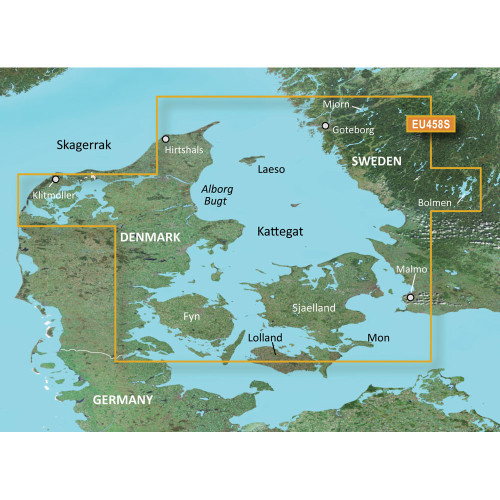
Garmin BlueChart g3 Vision HD Electronic Chart, VEU458S Göteborg to Fyn, Auto Guidance, Depth Range Shading Up to 10 Depth Ranges, 1 ft Contours, Shallow Water Shading

Garmin BlueChart g3 Vision Coastal Chart, VEU485S, Fuenterrabia to Gijon, Auto Guidance, Depth Range Shading, Up to 1 ft Contours