


Garmin BlueChart g3 Vision Coastal Chart, VEU461S, Thames Estuary


-
Perfect Fit, Guaranteed
Get the right part every time
-
Expert Support
Our in-house specialists know our products inside and out
-
Enhanced Value & Service
We go beyond the sale with professional and balanced services
-
Wordwide Delivery
Enjoy hassle-free worldwide delivery
Garmin BlueChart g3 Vision Coastal Chart, VEU461S, Thames Estuary
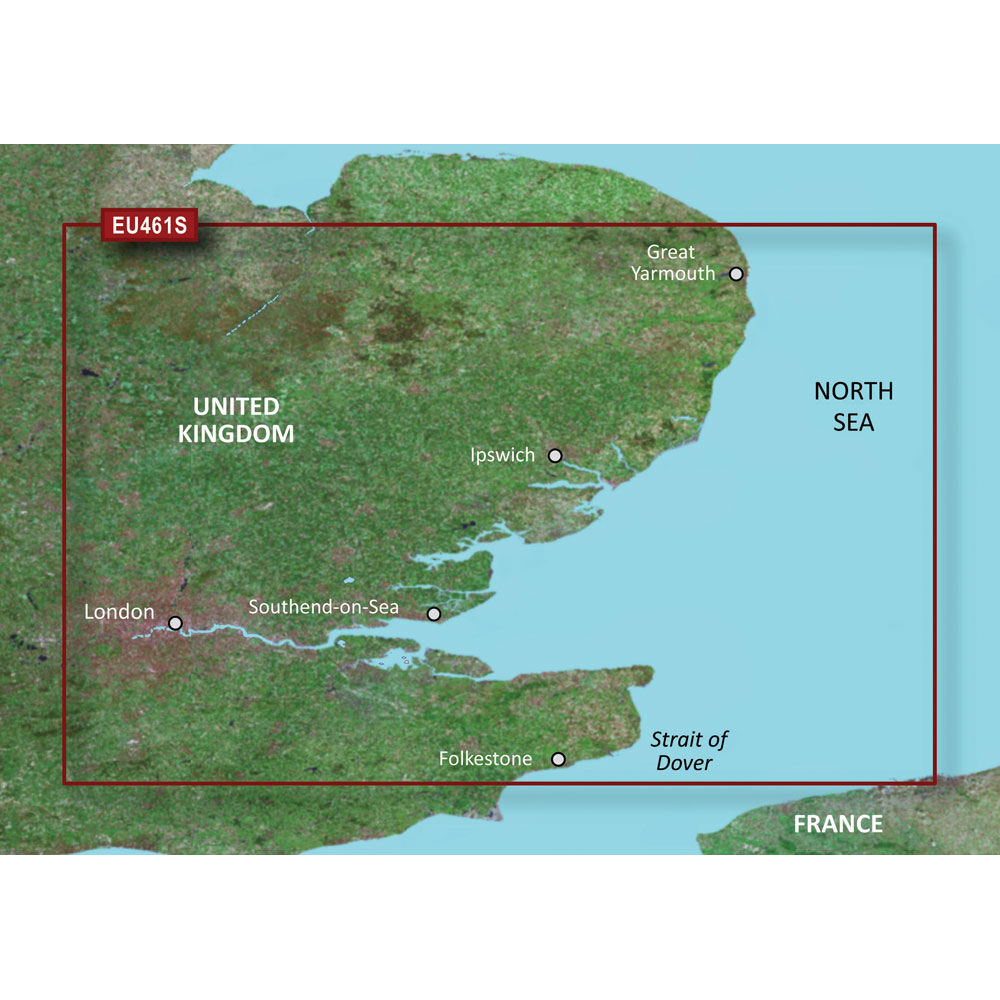
Garmin BlueChart g3 Vision Coastal Chart, VEU461S, Thames Estuary
Overview
The Garmin BlueChart g3 Vision HD VEU461S is an electronic chart covering Great Yarmouth to Folkestone, including the Thames Estuary and the River Thames up to Teddington Lock. It combines Garmin and Navionics chart data and adds tools that help you read depth and bottom detail when planning routes and working tight water.
Depth Range Shading lets you color up to 10 depth ranges, and 1 ft contours make bottom structure easier to interpret around banks, channels, and fishing marks. You also get satellite imagery overlays, aerial photography for many ports and marinas, plus FishEye and MarinerEye 3D views for a more intuitive picture of what is ahead and what is under the boat.
This chart is a good match for skippers running the Thames Estuary regularly, as well as coastal cruising between the East Anglian coast and the Dover Strait, where clear depth presentation and harbor imagery can save time when approaching unfamiliar entrances.
Key features
- Coverage spans Great Yarmouth to Folkestone, including the Thames Estuary and the River Thames up to Teddington Lock.
- Integrated Garmin and Navionics chart content for coastal navigation in the region.
- Auto Guidance calculates a suggested route using your set depth and overhead clearance.
- Depth Range Shading supports up to 10 depth ranges to help you keep an eye on your target depth.
- 1 ft contours for finer bottom detail when reading banks, channels, and structure.
- Shallow Water Shading can be set to highlight user-defined shallow depths.
- Satellite imagery overlay for a more realistic view when lining up entrances and approaches.
- FishEye and MarinerEye 3D views for perspective above and below the waterline.
- Aerial photography for many ports, harbors, and marinas in the coverage area.
Variants
This chart is offered in two formats for the same VEU461S coverage area. The difference is how you receive and load the chart data onto your Garmin chartplotter.
Format is the only option that varies between these versions.
- 010-C0805-00: Format microSD/SD. This is the card-based version for chartplotters that read charts directly from a microSD or SD chart slot.
- 010-D0403-00: Format Download. This version is delivered through Garmin Express, then used from an SD card in the chartplotter’s chart slot.
Compatibility and fit
This chart is intended for compatible Garmin chartplotters and multifunction displays that support BlueChart g3 Vision mapping. Feature availability can vary by chartplotter model and software, especially for 3D views, imagery layers, and route planning functions.
Installation and setup
For the microSD/SD version, insert the chart card into the chart card slot and keep it installed while you want access to the chart data. For the download version, Garmin Express is used to obtain the chart data before it is used from an SD card in the chart slot.
Navigation notes
Auto Guidance is a planning aid. Always cross-check routes against local conditions, notices, and what you see on the water, and keep a proper lookout when navigating shoals, buoyed channels, and crowded approaches.
Handling and care
Keep chart cards clean and dry, and store them out of direct spray and salt residue when not in use. If the card contacts saltwater, wipe it down and let it dry fully before returning it to the chartplotter.
We ship all in-store (FL) stock orders the same day if placed before 3 PM EST, Monday through Friday. Orders placed after this time will ship the next business day. Orders fulfilled from other warehouses or manufacturers may not ship the same day. If an item is out of stock, we will notify you promptly.
Related Products

Garmin BlueChart g3 Vision VUS025R Coastal Chart, Anchorage-Juneau

Garmin BlueChart g3 Vision HD VEU492S Coastal Chart, Kristinestad to Hanko

Garmin BlueChart g3 Vision HD Coastal Chart, VEU474S Aalborg to the Eider
Garmin BlueChart g3 Vision Coastal Chart, VCA008R, Newfoundland West, Auto Guidance

Garmin BlueChart g3 Vision HD Coastal Chart, New York, Auto Guidance