


Garmin BlueChart g3 Vision HD Electronic Chart, VEU472S Gulf of Bothnia Center, Auto Guidance, Depth Range Shading, 1 ft Contours


-
Perfect Fit, Guaranteed
Get the right part every time
-
Expert Support
Our in-house specialists know our products inside and out
-
Enhanced Value & Service
We go beyond the sale with professional and balanced services
-
Wordwide Delivery
Enjoy hassle-free worldwide delivery
Garmin BlueChart g3 Vision HD Electronic Chart, VEU472S Gulf of Bothnia Center, Auto Guidance, Depth Range Shading, 1 ft Contours
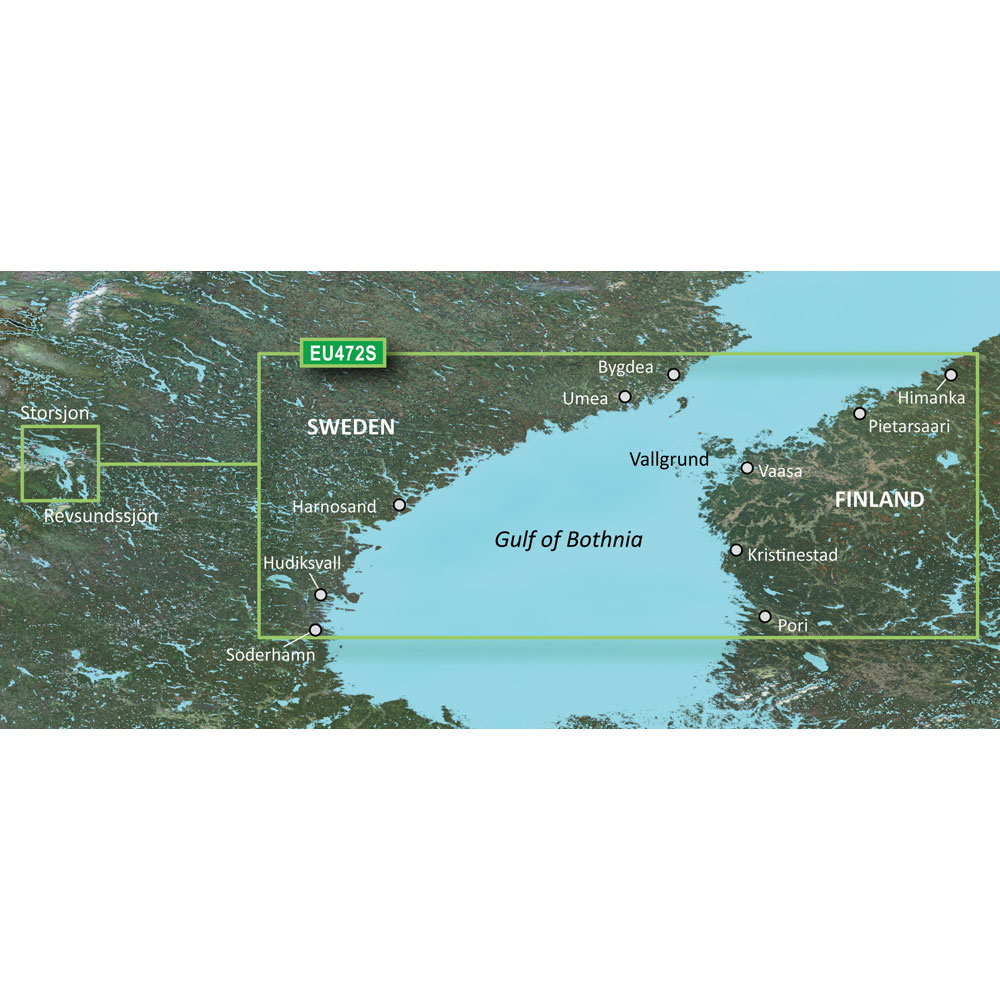
Garmin BlueChart g3 Vision HD Electronic Chart, VEU472S Gulf of Bothnia Center, Auto Guidance, Depth Range Shading, 1 ft Contours
Overview
The Garmin BlueChart g3 Vision HD is a coastal electronic chart for the central Gulf of Bothnia (VEU472S), covering waters from Umea to Soderhamn in Sweden and from Himanka to Pori in Finland, with extra detail around places like Pietarsaari, Vassa, Harnosand, Hudiksvall, Bygdea, and lake Storsjn.
It layers coastal navigation information with fishing-focused detail, including up to 1-foot contours where available, plus depth range shading that can be set across up to 10 ranges so you can keep an eye on the water you want to run in.
This is cartography for compatible Garmin chartplotters and sounders. Your display needs to support BlueChart g3 Vision features to see the advanced layers, and feature availability can vary by model and region.
Key features
- VEU472S coverage for the central Gulf of Bothnia, including detailed areas around Umea, Soderhamn, Himanka, Pori, Pietarsaari, Vassa, Harnosand, Hudiksvall, Bygdea, and lake Storsjn
- Integrated Garmin and Navionics cartography content for coastal navigation and bottom detail
- Auto Guidance route suggestions that factor in your entered depth and overhead clearance settings when supported by the chartplotter
- Depth Range Shading for up to 10 ranges and Shallow Water Shading at a user-defined depth to help call out thin water
- Up to 1-foot contours in areas where that data is available for tighter contour reading
- 3D views such as MarinerEye and FishEye for added perspective when supported
- High-resolution satellite imagery and aerial photos in supported areas and devices for visual reference around ports and landmarks
Variants
This chart is offered in two formats. The chart coverage and on-screen content are the same; the difference is how you receive and load it.
Both options require a compatible Garmin display with an SD or microSD card slot. The downloadable format is installed to an SD card using Garmin Express before you take it to the boat.
- 010-C0816-00: Format microSD/SD. A preprogrammed card that you insert into the chartplotter’s card slot to unlock the chart region on the water.
- 010-D0414-00: Format Download. Installed to an SD card using Garmin Express on a computer, then the SD card is used in the chartplotter for navigation.
Installation and setup
For the microSD/SD card version, power the chartplotter down, insert the card, then restart so the unit can index the chart data. Keep the card seated fully and avoid removing it while the unit is running.
For the download version, use Garmin Express to load the chart to an SD card, then move that card to the chartplotter. On first use, give the unit a moment to read the card and populate the chart layers.
Use on board
This chart is a good match for boaters running the Gulf of Bothnia who want local coverage with extra bottom detail for route planning, fishing structure, and tighter approaches. Auto Guidance can help with planning, but it is still on you to verify the route against conditions, notices, and what you see outside.
We ship all in-store (FL) stock orders the same day if placed before 3 PM EST, Monday through Friday. Orders placed after this time will ship the next business day. Orders fulfilled from other warehouses or manufacturers may not ship the same day. If an item is out of stock, we will notify you promptly.
Related Products

Garmin BlueChart g3 Vision HD Coastal Chart, VEU471S Gulf of Bothnia South, Auto Guidance, 1-Foot Contours, Depth Range Shading

Garmin BlueChart g3 Vision HD Electronic Chart, VEU473S Gulf of Bothnia North, Auto Guidance

Garmin BlueChart g3 Vision HD VEU491S Electronic Chart, Gulf of Finland, Auto Guidance, Depth Range Shading, 1 ft Contours, Satellite Imagery
Garmin BlueChart g3 Vision HD Electronic Chart VUS003R Cape Cod, Auto Guidance, Relief Shading, Depth Range Shading, 1 ft Contours, Satellite Imagery
Garmin BlueChart g3 Vision HD Electronic Chart, VEU458S Göteborg to Fyn, Auto Guidance, Depth Range Shading Up to 10 Depth Ranges, 1 ft Contours, Shallow Water Shading