


Garmin LiveScope Plus Perspective Mount, for LVS34 Transducer

-
Perfect Fit, Guaranteed
Get the right part every time
-
Expert Support
Our in-house specialists know our products inside and out
-
Enhanced Value & Service
We go beyond the sale with professional and balanced services
-
Wordwide Delivery
Enjoy hassle-free worldwide delivery
Garmin LiveScope Plus Perspective Mount, for LVS34 Transducer

Garmin LiveScope Plus Perspective Mount, for LVS34 Transducer
Overview
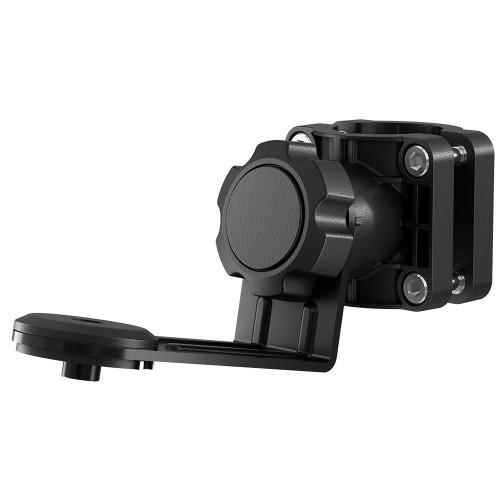
The Garmin 010-13228-00 is a perspective mode mount that clamps to a trolling motor shaft and lets you run a LiveScope Plus LVS34 transducer in an overhead, looking-down view.
It is built to be repositioned on the water, so you can move the transducer between Forward, Down, and Perspective views without swapping brackets. Perspective view is recommended for shallow water, with a recommended depth up to 20 ft (6 m).
Plan on updating both your chartplotter and the LiveScope system software as part of the install, then set the transducer orientation to Auto in the LiveScope installation settings so the view labels match the physical position.
Key features
- Works with the LiveScope Plus LVS34 transducer to add an overhead Perspective view, plus Forward and Down positions.
- Mount repositioning is done by swinging the arm and rotating the transducer to match the viewing-mode sticker.
- Includes port-side and starboard-side setup options to match how your trolling motor stows.
- Clamp-style shaft bracket installs on a trolling motor shaft, with an included rubber insert for 25 mm (1 in) shafts.
- Uses the included hardware and hex wrench; the shoulder-bolt torque specification is 2.5 lbf-ft (3.4 N-m).
- Calls for a service loop in the transducer cable and secure routing with electrical tape or cable ties to avoid tight bends.
What’s included
- Perspective mode mount components (shaft bracket and extension arm parts)
- Mounting hardware (including M6 screws, shoulder screws, and washers)
- Hex wrench
- Rubber insert for 25 mm (1 in) trolling motor shafts
- PORT SIDE and STARBOARD SIDE stickers
Compatibility and fit
This mount is intended for the LiveScope Plus LVS34 transducer and is designed around a trolling motor shaft installation. It can be mounted on either the port or starboard side of the shaft, but the extension arm and sticker selection depends on how your trolling motor propeller sits when stowed.
Before tightening everything down, dry-fit the bracket and transducer so it does not interfere with stowing and deployment, and so the bracket orientation faces forward on the trolling motor as specified in the install setup.
Installation and setup
The bracket clamps around the trolling motor shaft using the included M6 screws. If your shaft is 25 mm (1 in), install the rubber insert before tightening the bracket.
After the bracket is secured, attach the extension arm and transducer with the included shoulder screws and washers, tightening to the specified 2.5 lbf-ft (3.4 N-m). Route the transducer cable with a service loop, then secure it so the cable is supported through steering travel and stow motion.
Finish by setting Orientation to Auto on your compatible chartplotter in the LiveScope installation menu, then align the transducer to the sticker marks for the view you want to run.
Use cases on board
This mount is a good match for anglers running LiveScope Plus on a trolling motor who want a fast way to switch into an overhead view when working shallow flats, docks, and cover, then rotate back to Forward or Down for tracking targets off the bow.
Maintenance and care
Recheck fasteners after the first few trips, especially if the trolling motor sees hard waves or long runs. If you use the boat in brackish or salt water, a quick rinse helps keep the bracket and moving joints clean and easier to adjust.
We ship all in-store (FL) stock orders the same day if placed before 3 PM EST, Monday through Friday. Orders placed after this time will ship the next business day. Orders fulfilled from other warehouses or manufacturers may not ship the same day. If an item is out of stock, we will notify you promptly.
Related Products

Garmin 0-Degree Pole Mount, For LiveScope Plus LVS34 Transducer

Garmin 8-Degree Pole Mount, For LiveScope Plus LVS34 Transducer
Out of stock

Garmin LiveScope XR Perspective Mode Mount, For LVS62 Transducer
Out of stock

Garmin Trolling Motor Barrel Mount, For LiveScope Plus LVS34

Garmin ECHOMAP Ultra 102sv Chartplotter/Sonar Combo, LiveScope Plus LVS34 Transducer
Out of stock